How to make cinematic food animation?
AI Tools Used
Step 1 : Create a first food image
Go to https://gemini.google.com/app → Click on “Create Image” → Paste this prompt → Submit → Download first image
Prompt:
Create A Single Photoshoot Of "[PRODUCT NAME]", vertical 9:16. Pure [COLOR NAME] background. No table, no plate, no stands, no extra props.
Step 2 : Create a second food image
In same chat window on → Paste second image prompt → Submit → Download second image
Prompt:
Now create with proper label names of each ingredient, vertical 9:16. Pure [COLOR NAME] background. No table, no plate, no stands, no extra props. A clean "exploded view"
Step 3 : Make a video
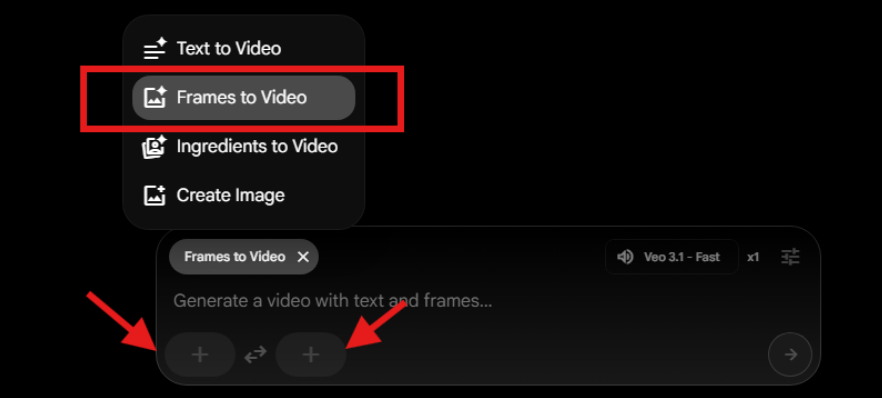
Go to https://labs.google/fx/tools/flow → Select “Frames to Video” in Chat → Upload both images using + icon
Apply final video prompt → Submit → Download the video

Prompt:
Vertical 9:16 frame. Camera fully locked with zero movement. A deep, pitch-black background fills the scene. At the opening moment, a fully assembled hero product sits perfectly centered. With an ultra-smooth and almost imperceptible motion, the subject begins to evolve, creating a premium, cinematic reveal while maintaining a clean, minimalist aesthetic. Lighting remains controlled and dramatic, keeping full focus on the product silhouette and details.